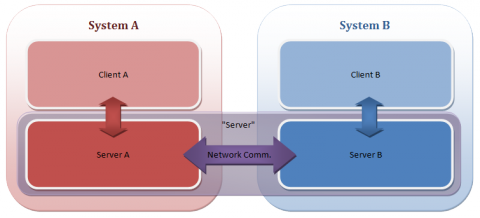
In my previous post, I weighed the advantages and disadvantages of my game vs. a standard FPS with regard to networking. After doing so, I came up with an initial network design.
The biggest issue, personally, was dealing with the causality of the network game. Each player gets information about the other with a delay, so neither player is ever seeing exactly the same set of circumstances (perfectionism and network lag don’t mix very well). I think Shawn Hargreaves describes it best in one of his networking presentations: he says to treat each player’s machine as a parallel world. They’re not exact, but the idea is to try to make them look as close as possible. It doesn’t matter if things don’t happen exactly the same, but you don’t ever want the following conversation to occur:
Player 1: “Wow, can you believe I killed that giant enemy at the last second? That was amazing!”
Player 2: “…What giant enemy?”
Procyon’s Initial Design
The design I started with was a hybrid of both the peer-to-peer lockstep and client-server models.
I haven’t had much development time in the last (nearly two) month(s), but I have had time to nearly finish up the networking code for the game, so I thought I would describe some of the work that went into the design of the system.
Resources
I tried to find some references on how most shmups (shoot-em-ups) such as my current game handle their networking, but I didn’t really find anything. There are a lot of resources on how RTS games do it (such as this great article about Age of Empires’ networking), and even more articles about how to write networking for an FPS game (the best of which, in my opinion, are the articles about the Source engine’s networking and the Unreal engine’s networking). There’s also a great series of articles on the Gaffer on Games site.
One of the most seemingly-relevant things to my game that I read was that, in current system emulators (for instance, SNES emulators) that have network play, they work in lock step with each other…that is, each system sends the other system(s) its inputs, and when all inputs from all systems have arrived, they can tick the simulation forward. I did an early experiment to see how well this would work with my game, and it turns out, not so well – the latency introduced with even a moderate ping (100ms) is rather prohibitive. The player would press up on the gamepad and have to wait for the ship to start moving…and it would only get worse with higher latencies! Obviously, this wouldn’t work.
Since there were many articles about the FPS model of networking, I opted to use it as a starting point, as my game is also a fast-action game. First off, I decided to make a (partial) list of the advantages and disadvantages of my game type vs. the FPS model:
Level 1 is effectively complete (excluding some global gameplay and balance issues.)
Here’s a video:
Yay!
This will probably be the norm for a while, unless I find myself with an excess of time some night; there’ll probably just be some project updates for a few weeks.
Progress on finishing the first level is going good, all of the main enemies are implemented, the level 1 boss is designed (but not yet coded), and I’m on my way towards getting the level done by the end of the month.
(Screens and videos below the fold)
I haven’t made any specific posts about my game in a while, so I thought I’d just make a quick status update.
Code Progress
Progress is coming along quite nicely. Most of the game systems are done (though I have some modifications to make to enable things like curved enemy beam weapons and side-by-side ship paths).
- Enemies have multiple ways of spawning, and can follow paths (or not).
- All four weapons are implemented
- The player can now die (and respawn). Lives are tracked (but the game currently doesn’t game-over if the player dies, as that would be a pain for testing).
- The scoring system is in (with a first run at a score multiplier system).
- The on-screen display has been completely redesigned.
- Two players can play at once, which includes a special combination lightning attack that is even more devastating than the standard lightning attack.
(Screens and videos below the fold)
The .NET framework’s reflection setup can be amazingly useful. At a basic level, it allows you to get just about any information you could want about any type, method, assembly, etc that you could want. In addition, you can programmatically access type constructors and methods, and invoke them directly, allowing you to do all sorts of neat stuff.
One useful application of this is in the creation of state machines. Imagine an entity in a game that flies around in a pattern for a bit, then stops to shoot some bullets, then returns to flying. Such an entity would have two states, “Flying” and “Shooting.”
You’re flying your ship down a cavern, dodging and weaving through enemy fire. It’s becoming rapidly apparent, however, that you’re outmatched. So, desperate to survive, you flip The Switch. Yes, that switch. The one that you reserve for those…special occasions. Your ship charges up and releases bolt after deadly bolt of lightning into your opponents, devastating the entire enemy fleet.
At least, that’s the plan.
But how do you, the game developer, RENDER such an effect?
Yikes, I’m getting backlogged on the stuff I want to write about!
Anyway, this will probably be way shorter than it deserves, but my memory on the subject is about 3 months old. Basically, this will be more or less a short chronicle of the dumb story of the mesh vs. mesh tests.
Appearances Can Be And Are Frequently Deceiving
When I started work on the collision detection observation, there was one surprising fact: the mesh vs. mesh code (used to determine whether the player was intersecting enemy ships) was working at full speed! I didn’t seem to have to do any optimization at all on it to get it working.
I did, however, opt to go ahead and change the functions to not be recursive (as the current implementation was, of course, recursing into both meshes’ sphere trees). When I finished that work, suddenly, the routine was much, much slower. Was, in this case, the recursion overhead better than what it took to handle the double tree recursion in a non-recursive way?
I have been hard at work on my game (in my ridiculously limited spare time) for the last month and a half. One major hurdle that I’ve had to overcome was collision detection code. Specifically, my collision detection performed great on my PC, but when running it on the Xbox 360, everything would slow to a crawl (in certain situations).
The types of collision detection I have to deal with are varied, due to the weird way that I handle certain classes of obstacle (like walls):
- Player bullets vs. Enemy – Player bullets are, for simplicity, treated as spheres, so sphere/mesh testing works here.
- Enemy bullets vs. Player – Same as above.
- Player vs. Wall – Because the game’s playing field is 2D, the walls in-game are treated as 2D polygons, so it boils down to a 2D mesh vs. polygon test.
- Player vs. Enemy – Mesh vs. Mesh here
- Beam vs. Enemy – The player has a bendy beam weapon. I divide the curved beam up into line segments, and do ray/mesh tests.
The worst performance offender was, surprisingly, the sphere vs. mesh test, which will be the subject of this article. Before optimizing, when I’d shoot a ton of bullets in a certain set of circumstances, the framerate would drop well into the single digits, because the bullet vs. mesh (sphere vs. mesh) collision couldn’t keep up. Here are the things that I changed to get this test working much, much faster.
For those of you not using Direct3D 9 or XNA, you can safely ignore this post (OpenGL and Direct3D 10 are immune to this particular oddity). However, if you are, it’s likely that you’ve had to deal with the dreaded half-texel offset. Today, after I don’t know how many years of using Direct3D, I came to realize that I really didn’t understand what the source of the issue was. Now that I’ve sort of gotten a handle on it, I figured I’d post it to my super new journal. Consider it a test run.
Coordinate Spaces
The first thing to note is the basic coordinate space. I’m going to be referring to texture space and clip space a lot, so I thought I’d just do a quick refresher here on what I mean (mostly to make sure you’re thinking with the same terminology that I’m using).
- Clip space – the post-projection half-cube of space where X,Y in [-1…1] and Z in [0…1]
- X = -1 is the far left edge of the screen
- X = 1 is the far right edge
- Y = -1 is the bottom edge
- Y = 1 is the top
- Z = 0 is near (the near plane)
- Z = 1 is far (the far plane)
- Texture space – the area where u,v in [0…1] on a texture map making up a single end-to-end repeat of the texture.
- 0,0 represents the upper-left coordinate on the texture
- 1,1 is the lower-right.